
Chronometer (Time Units)
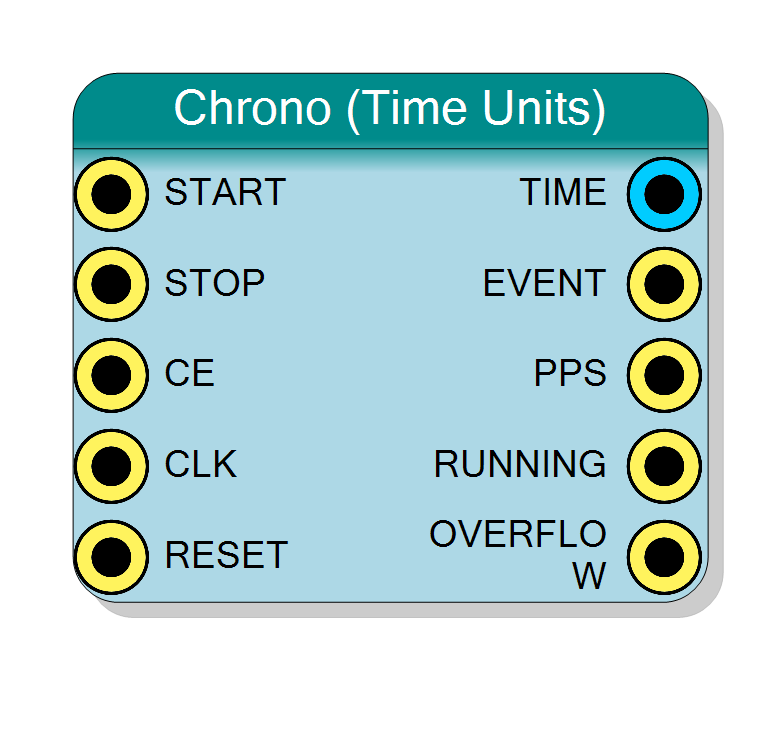
Chronometer that counts real time units instead of clock cycles. The output scale is selectable among hours, minutes, seconds, milliseconds and microseconds; the clock frequency is a property. Controlled by START/STOP edges or by an ENABLE level; after a stop it can continue or restart from zero, and the output can follow the count in real time or show only the result of the last measurement. Provides an EVENT pulse on every unit and a PPS pulse on every second of measured time.
Introduction
This block is a stopwatch that speaks real time. You tell it the
frequency of its clock (Clock Frequency, in Hz) and the unit you want
to read (Time Unit: h, m, s, ms or us); TIME then counts
elapsed hours, minutes, seconds, milliseconds or microseconds directly, with
no conversion needed downstream.
Three options choose how it behaves:
| Property | Values | Meaning |
|---|---|---|
| Control Mode | Start/Stop or Enable | START/STOP rising edges, or run while ENABLE is high |
| After Stop | Continue or Restart | next start resumes the held time, or restarts at 0 |
| Output Update | Real time or On stop | TIME follows the count, or changes only at the stop |
- EVENT pulses for one clock every time TIME advances by one unit.
- PPS (pulse per second) pulses for one clock on every elapsed second of measured time, whatever the selected unit.
The time base is exact for any integer clock frequency: when the number
of clocks per unit is not an integer (for example 62.5 MHz on the us
scale = 62.5 clocks per microsecond) a fractional accumulator spaces the
ticks 62 and 63 clocks apart so that the average is exact and the error
never accumulates.
$$ \mathrm{TIME} = \left\lfloor \frac{N_{\mathrm{clk}}}{f_{\mathrm{clk}} \cdot T_{\mathrm{unit}}} \right\rfloor $$
where $N_{\mathrm{clk}}$ is the number of clocks counted while running and $T_{\mathrm{unit}}$ is the selected unit in seconds.
Pin Description
Start command, rising edge. Present only with Control Mode = Start/Stop.
Acts one clock after the pin rises (two-register synchroniser). Sets RUNNING; counting starts on the next clock. Resumes or restarts according to After Stop. Ignored while already running.
Default: ‘0’ if left unconnected.
Stop command, rising edge. Present only with Control Mode = Start/Stop.
Acts one clock after the pin rises; that clock is still counted. Clears RUNNING. Wins over a simultaneous START.
Default: ‘0’ if left unconnected.
Clock enable. When ‘0’ the block is frozen and the clocks are not counted.
Default: ‘1’ if left unconnected.
Clock. Its frequency MUST match the Clock Frequency property.
Default: global clock if left unconnected.
Reset, active high. Clears TIME, the fractions and the synchronisers and stops the chronometer.
Default: global reset if left unconnected.
Elapsed time in the selected unit (unsigned), whole units.
- Output Update = Real time: follows the count, holds while stopped.
- Output Update = On stop: updated only when a measurement stops, holds until the next stop.
Run while high. Present only with Control Mode = Enable.
Rising edge starts, falling edge stops, each one clock after the pin edge. The measured time is exactly the number of clocks ENABLE was high.
Default: ‘0’ if left unconnected.
Properties
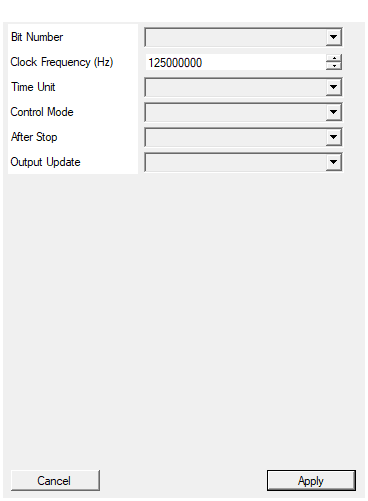
Set the number of bit of the TIME output (number of time units counted)
Width of TIME: 8, 16, 24, 32, 40, 48, 56, 64 bits.Default: 32
Options: 8 16 24 32 40 48 56 64
Frequency in Hz of the clock connected to CLK. Any integer value is exact: a non-integer number of clocks per unit is handled by a fractional accumulator.
Frequency of the CLK input in Hz (integer, 1 to 1 000 000 000).
Example: 125000000 for 125 MHz. Must be at least 1 000 000 for unit
us and at least 1 000 for unit ms.
Default: 125000000
Range: 1 – 1000000000
Unit of the TIME output and of the EVENT pulse: h, m, s, ms or us
Unit of TIME and EVENT: h (hours), m (minutes), s (seconds), ms (milliseconds), us (microseconds).Default: s
Options: h m s ms us
Start/Stop: rising edge of START starts, rising edge of STOP stops. Enable: runs while ENABLE is high.
- Start/Stop: pins START and STOP, rising edges.
- Enable: pin ENABLE, runs while high.
Default: Start/Stop
Options: Start/Stop Enable
Continue: the next start resumes from the held time (intervals add up). Restart: the next start restarts from zero; the last value stays at the output until then.
- Continue: the next start resumes from the held time; intervals add up.
- Restart: the next start restarts from zero; the last value stays at the output until then.
Default: Continue
Options: Continue Restart
Real time: TIME follows the running count. On stop: TIME is updated only when the measurement stops and holds that value.
- Real time: TIME follows the running count.
- On stop: TIME is updated only at the end of each measurement.
Default: Real time
Options: Real time On stop
Functional description
Time base
Every counted clock adds $R$ to an accumulator, where $R$ is the number of
base ticks per second (1 000 000 for us, 1 000 for ms, 1 for s, m
and h). When the accumulator reaches the clock frequency $f$ a base
tick is produced and $f$ is subtracted. Over exactly $f$ clocks this gives
exactly $R$ base ticks, so the rate is exact for every integer $f \ge R$.
us,ms,s: every base tick is a unit tick.m: one unit tick every 60 base ticks (seconds).h: one unit tick every 3600 base ticks (seconds).
On a unit tick TIME increments and EVENT pulses. PPS pulses on
every second of measured time: with s, m and h that is every base
tick, with ms every 1000 ticks, with us every 1 000 000 ticks. With
unit s, EVENT and PPS coincide.
PPS is measured time, not wall-clock time. It pulses only while the chronometer is RUNNING and it keeps its phase across STOP/START. For a free-running 1 Hz reference tie START to
1(or pulse it once) and STOP to0.
Control Mode: start and stop
- Start/Stop: the symbol has START and STOP. A rising edge on START starts, a rising edge on STOP stops. Any pulse width works. If both edges act on the same clock, STOP wins. A START while already running is ignored.
- Enable: the symbol has ENABLE. The chronometer runs while ENABLE is high: its rising edge starts, its falling edge stops.
- In both modes the pins pass a two-register synchroniser and the action lands one clock after the pin edge. Counting begins on the clock after the start; the clock on which the stop acts is still counted. So a start pin edge at clock $p$ and a stop pin edge at clock $q$ measure exactly $q-p$ clocks (in Enable mode: exactly the number of clocks ENABLE was high).
- An unconnected control pin reads ‘0’ (never starts).
After Stop: continue or restart
- Continue: the next start resumes. TIME and the fraction of the unit already elapsed are both kept, so successive intervals add up exactly, down to the clock. TIME is the total running time.
- Restart: the next start restarts from zero: TIME, the sub-unit fraction and the PPS phase are cleared at that start. Until then the output keeps showing the last value. TIME is the time of the current (or last) interval.
Output Update: real time or on stop
- Real time: TIME follows the count while running and holds while stopped.
- On stop: TIME changes only when a running measurement stops, in the same sample in which RUNNING falls, and holds that value until the next stop. While running it keeps showing the previous result (0 before the first stop). Combined with Restart this gives a lap timer: TIME is always the length of the last completed interval. EVENT, PPS and OVERFLOW keep following the internal count in real time.
Overflow
TIME wraps from $2^N-1$ to 0; OVERFLOW pulses for one clock together with the EVENT of that wrap.
RESET and CE
- RESET clears everything and stops the chronometer: a new START is needed afterwards.
- CE=‘0’ freezes the block completely (counting and synchronisers); the pulse outputs read ‘0’ while CE is low. CE=‘0’ therefore stretches time: only CE-qualified clocks are counted.
Timing diagram
Unit s with a 10 Hz clock (one second = 10 clocks), TIME shown in units:
RUNNING rises one clock after the START pin; TIME becomes 1 after exactly 10 counted clocks, with EVENT and PPS. The 4 clocks counted after that (0.4 s) are kept when STOP arrives and are credited at the next START.
Enable + Restart + On stop (lap timer), same clock: a 2.9 s ENABLE window then a 1.9 s one. TIME shows 2, then 1, each from the end of its window:
The Test Timing window (right click on the block) shows four simulated demonstrations: seconds with stop/resume/reset (Start/Stop, Continue, Real time), the lap timer (Enable, Restart, On stop), minutes with PPS, and the fractional 2.5-clocks-per-tick case.
Choosing the parameters
Clock Frequency
Enter the frequency of the clock actually connected to CLK, in Hz (for
example 125000000 for 125 MHz, 62500000 for 62.5 MHz). Range 1 Hz to
1 GHz. The selected unit must not be faster than the clock: us needs at
least 1 MHz, ms at least 1 kHz. The property window refuses invalid
combinations.
Bit Number
Maximum TIME before wrapping:
| Bit Number | Max TIME | in us |
in ms |
in s |
|---|---|---|---|---|
| 16 | 65 535 | 65.5 ms | 65.5 s | 18.2 h |
| 24 | 16 777 215 | 16.8 s | 4.66 h | 194 days |
| 32 | 4 294 967 295 | 71.6 min | 49.7 days | 136 years |
| 48 | 2.8·10^14 | 8.9 years | 8 900 years | – |
Accuracy
- Resolution of TIME: one unit. Resolution of the measured interval: one clock.
- With a non-integer number of clocks per unit, each tick may be up to one clock late against the ideal grid; the error does not accumulate.
- The absolute accuracy is the accuracy of the clock itself.
Typical use cases
- Run-time / live-time counters in seconds or milliseconds readable by software without conversions.
- Experiment duration and dead-time accounting.
- Periodic actions every second/millisecond of an active acquisition (EVENT or PPS used as an enable).
- Uptime counter in hours.
- Lap timer: Enable + Restart + On stop gives the duration of every gate or busy window, in the unit you need, stable for software to read.
Comparison with Chrono (Start/Stop)
| Feature | Time Units | Start/Stop |
|---|---|---|
| TIME unit | h, m, s, ms, us | clock cycles |
| Clock frequency | property | not needed |
| Unit / second pulse | EVENT, PPS | – |
| Control | START/STOP edges or ENABLE | START/STOP edges |
| Sub-unit fraction | kept across STOP/START | n/a |
| Overflow | one-clock pulse on the wrap | one-clock pulse |
Resources & Timing
-
Latency: START/STOP/ENABLE act 1 clock after the pin edge; TIME, EVENT, PPS registered
-
Throughput: 1 clock per sample
One N-bit TIME counter, one accumulator of about log2(Clock Frequency) bits, a PPS prescaler (up to 20 bits for us) and a unit prescaler (12 bits for h). No DSP, no BRAM.