
Find Max/Min
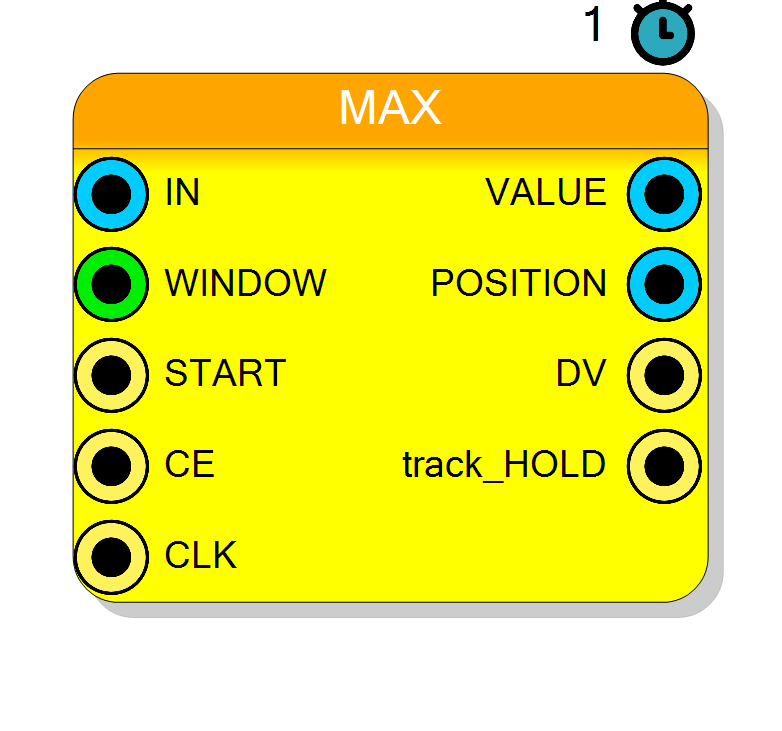
Finds the maximum or minimum value in a streaming data window. Tracks the peak/valley value and its position over a configurable window size. Includes control signals for starting acquisition and monitoring status.
Introduction
This block continuously monitors an input data stream to find either the maximum or minimum value within a specified search window. It outputs both the peak value and its position (index) within the window.
The component operates in two modes:
- MAX mode: Finds the largest value in the window
- MIN mode: Finds the smallest value in the window
This is useful for peak detection, envelope tracking, and statistical analysis of streaming data.
Pin Description
Acquisition status indicator (1-bit).
- ‘1’ = Tracking mode (actively acquiring samples)
- ‘0’ = Hold mode (window complete, holding results)
Properties
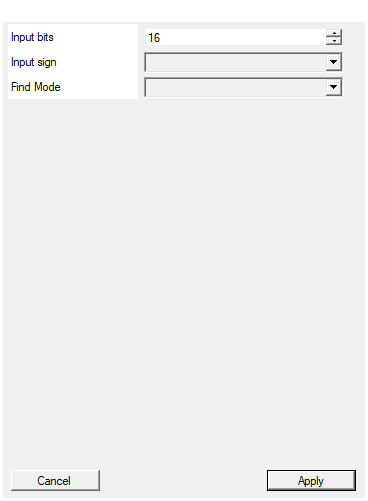
Set the number of bits of the input
Number of bits for the input data and peak value output. Range: 2-2048 bits.Default: 16
Range: 2 – 2048
Select the sign/unsign of the input
Selects input interpretation: UNSIGNED (default) or SIGNED (two’s complement). Affects how values are compared.Default: UNSIGNED
Options: UNSIGNED SIGNED
Select if algorith look for MAX or MIN
Peak detection mode: MAX (find maximum value) or MIN (find minimum value) within the window.Default: MAX
Options: MAX MIN
Functional description
The Find Max/Min component implements a sliding window peak detector. It examines a configurable number of consecutive samples and identifies the extreme value (maximum or minimum) and its location.
Operation Sequence
- START signal initiates a new search window
- Component samples input on each clock when CE (clock enable) is high
- Compares each new sample against the current peak value
- Updates peak value and position when a new extreme is found
- After WINDOW samples, asserts DV (data valid) and outputs results
- TRACKHOLD indicates acquisition state (track vs. hold)
Peak Finding Algorithm
MAX mode: $$ \mathrm{VALUE} = \max_{i=0}^{W-1} \mathrm{IN}[i] $$
MIN mode: $$ \mathrm{VALUE} = \min_{i=0}^{W-1} \mathrm{IN}[i] $$
Where $W$ is the window size.
Position Tracking
The POSITION output indicates the index (0 to WINDOW-1) where the peak was found. If multiple samples have the same peak value, the position of the first occurrence is reported.
Latency and Timing
The component always has 1 clock cycle of latency (registered operation).
| Property | Latency (clock cycles) |
|---|---|
| Find Max/Min | 1 |
Processing time = WINDOW × (number of clock cycles between CE pulses)
Control Signals
- START: Rising edge begins a new acquisition window
- CE: Clock enable for sampling (typically ‘1’ for continuous operation)
- TRACKHOLD: Status output (‘1’ = tracking/acquiring, ‘0’ = holding result)
- DV: Data valid output (‘1’ when results are valid after window completion)
Typical use cases
- Peak/valley detection in waveform analysis
- Envelope detection in signal processing
- Finding extrema in ADC data streams
- Statistical analysis of sensor readings
- Trigger generation based on maximum/minimum values